Ruuvi Airin tämänhetkistä ilmanlaatua ilmaisevan LED-valon kirkkauden säätö on jo tuettu Airin laiteohjelmistossa ja kirkkaustila on mahdollista valita laitteen pohjassa olevaa kolopainiketta painamalla. Lisäsimme lyhyen ohjeen tästä tukimateriaaliin.
2 Likes
Kehitystoive tähän: Ajastettu himmennys yöajaksi. Vaikka ei tuo normaalikaan kirkkaus minua yöaikaan ole häirinnyt. Yöpöydällä oleva kello valaisee enemmän 
4 Likes
Hei @TapaniV tämä ajatus on vilahtanut meillä kyllä sisäisessä keskustelussa, mutta ei vielä tiedetä onko ajatus toteuttamiskelpoinen.
Näin opensourcemaailmassa voisi olla varsin siistiä jos kirkkauden säätö olisi mahdollista jonkun apin tai muun vastaavan dokumentoidun ei-fyysisen tavan kautta mahdollista, jotta edes nörteimmät ihmiset voisivat esim. tehdä kotiautomaatiovirityksiä tälle, jos ns. virallista tukea ajastetulle säädölle ei ole tulossa
2 Likes
Bluetooth API meillä itseasiassa on jo olemassa sisäisessä kehitysversiossa, dokumentoimme sen ja julkaisemme yhteisölle Airin lähdekoodien kanssa lähiaikoina.
1 Like
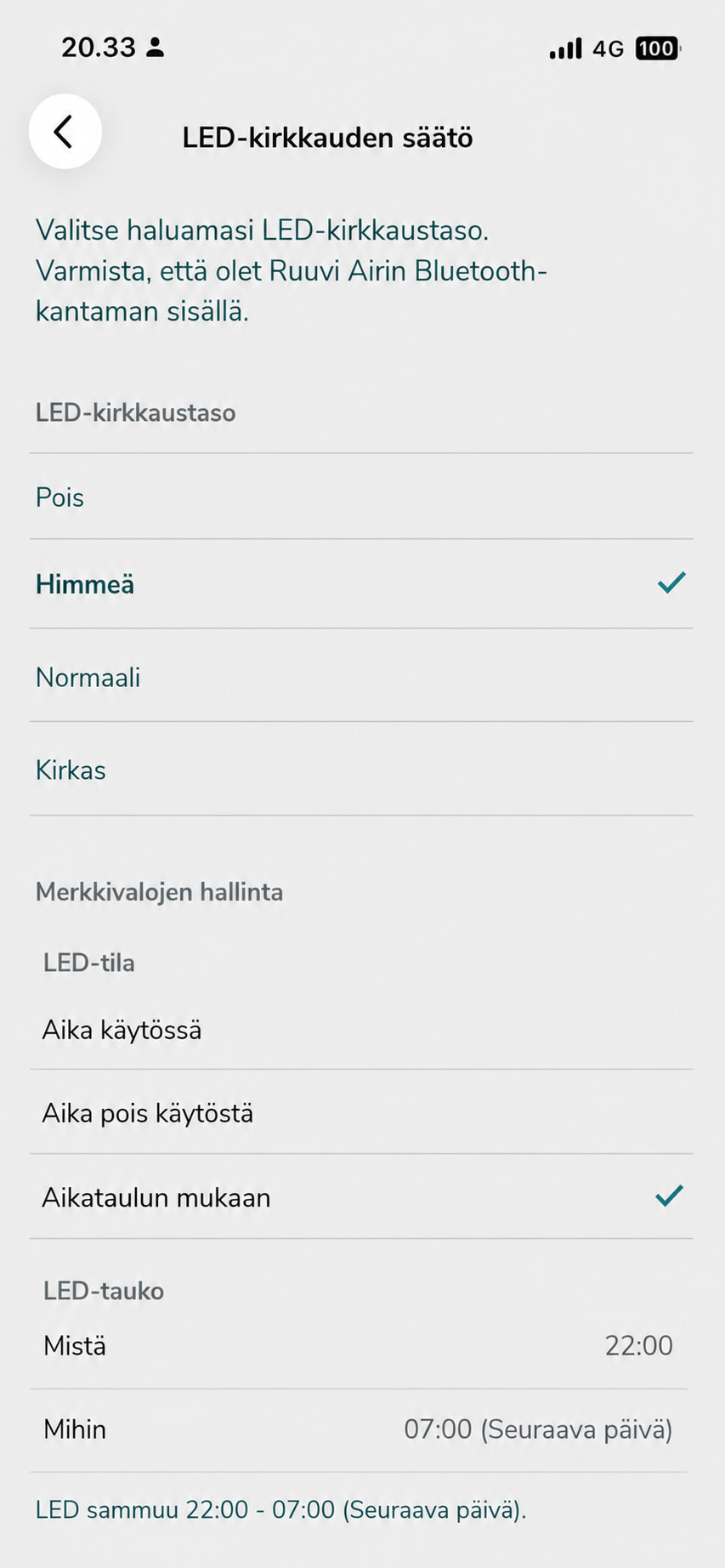
Yömoodi, LED-valon ajastus, mikä ikinä se onkaan, niin en ehkä jätä näitä lisää ostamatta sen puutteen takia, mutta jos torpassa on useampi Air, ja yöllä niistä KAIKISTA haluaisi LEDit pimeäksi, niin vaihtoehdot olisi käydä jokainen erikseen läpi, tai sovelluksesta säätää yksitellen? Ei, puhelinta ei ole aina ulottuvilla ja muutamassa hankalassa paikassa fyysinen tavoiteltavuus olisi heikkoa. Testasin teippiä valon edessä, kun kävin nukkumaan, kun laite on lähellä, mutta tein tein 3D-tulostimella ikkunan, joka peittää LED-valon, aamulla avaan sen. Kuulostaa typerältä… Jotenkin näille pitäisi syöttää kellonaika- ja aikavyöhyke, ja pitää ajan tiedot ajan tasalla.
Valikko voisi olla jotakin tällaista:
1 Like
Google translates this as:
Adjusting the brightness of the LED indicating Ruuvi Air’s current air quality is already supported in the device firmware, and the brightness mode can be selected by pressing the recessed button on the bottom of the device. We have added a brief guide on this to the support materials.
A suggestion for improvement: scheduled dimming for nighttime. Although the normal brightness hasn’t actually bothered me at night; the clock on my nightstand gives off more light .
This idea has come up in our internal discussions, but we don’t yet know if it is feasible.
Scrin replied: In the open-source world, it would be pretty cool if brightness adjustment were possible via an app or some other documented, non-physical method—allowing even the biggest nerds to set up home automation hacks for it, for instance—especially if there’s no so-called official support for scheduled adjustments on the horizon.
Otso said:We actually already have a Bluetooth API in our internal development version; we will document it and release it to the community alongside the Air source code in the near future.
saulis addedAs for night mode or LED scheduling—whatever you want to call it—I probably wouldn’t skip buying more of these just because that feature is missing. However, if you have several Air units in the house and want the LEDs turned off on *all* of them at night, your only options would be to go around to each one individually or adjust them one by one via the app? No—my phone isn’t always within reach, and some units are in awkward spots where physically accessing them would be difficult. When the device is nearby, I’ve tried putting tape over the light before going to sleep, or using a 3D-printed shutter to cover the LED and opening it in the morning. That sounds silly… Somehow, these devices need to be fed the time and time zone and keep that information up to date.
The menu could look something like