# How can I read data output from Ruvvi tag
**URL:** https://f.ruuvi.com/t/how-can-i-read-data-output-from-ruvvi-tag/4075
**Category:** 🇬🇧 Development projects with Ruuvi products
**Created:** [4 March 2020 20:34 UTC](https://f.ruuvi.com/t/how-can-i-read-data-output-from-ruvvi-tag/4075 "2020-03-04T20:34:08Z")
**Posts on this page:** 12
**Page:** 1
### Author:  [@Cindy](https://f.ruuvi.com/u/Cindy)
#### Post date: [4 March 2020 20:34 UTC](https://f.ruuvi.com/t/how-can-i-read-data-output-from-ruvvi-tag/4075/1 "2020-03-04T20:34:08Z")
Hi
I’m using ruuvi tag on devkit with nrf52 DK. I’m testing some added sensors on the pinout of the devkit. I use nrf52 DK to reprogram ruuvi tag, I just wondering if there any way I can see data output on Putty(or other tools). like when I use nrf52 DK to check the output? I’m using SEGGER Embedded Studio.
Thanks,
Cindy
---
### Author:  [@dgerman](https://f.ruuvi.com/u/dgerman)
#### Post date: [5 March 2020 01:20 UTC](https://f.ruuvi.com/t/how-can-i-read-data-output-from-ruvvi-tag/4075/2 "2020-03-05T01:20:55Z")
If you want to look at the advertising packets transmitted by the ruuvi you could consider using a raspberry Pi Zero W with the
> hcitool
utility to read packets and
> hcidump
to intercept them and output them in hex.
See documentation on hcidump [here](http://real-world-systems.com/docs/hcidump.1.html)
This is the way the excellent RuuviCollector gets the data.
PS What sensors have you added?
---
### Author:  [@otso](https://f.ruuvi.com/u/otso)
#### Post date: [5 March 2020 10:15 UTC](https://f.ruuvi.com/t/how-can-i-read-data-output-from-ruvvi-tag/4075/3 "2020-03-05T10:15:38Z")
You can use Segger tools to view RTT prints. [https://www.segger.com/products/debug-probes/j-link/tools/rtt-viewer/](https://www.segger.com/products/debug-probes/j-link/tools/rtt-viewer/) . Also Segger Embedded Studio will print the RTT prints to your debug console. Default Ruuvi Firmware doesn’t print anything to save space on release binaries.
---
### Author:  [@theBASTI0N](https://f.ruuvi.com/u/theBASTI0N)
#### Post date: [6 March 2020 05:31 UTC](https://f.ruuvi.com/t/how-can-i-read-data-output-from-ruvvi-tag/4075/4 "2020-03-06T05:31:16Z")
On linux you can also view the RTT prints from the command line.
In one terminal run:
JLinkExe
Then type:
```auto
connect
```
enter for default
```auto
S
```
enter for default speed
In another terminal run:
```auto
JLinkRTTClient
```
This will allow you to see the messages being printed.
---
### Author:  [@Cindy](https://f.ruuvi.com/u/Cindy)
#### Post date: [6 March 2020 15:03 UTC](https://f.ruuvi.com/t/how-can-i-read-data-output-from-ruvvi-tag/4075/5 "2020-03-06T15:03:47Z")
Thanks for your reply osto,
I didn’t use default Ruuvi Firmware, I used Nordic SDK.
if I use nrf52 DK, I can see the data on Putty ok, but when I use ruuvi tag + devkit on top the nrf52 DK, I cant see data output from it. (but the led light on my own board works ok so I assume it means ruvvi tag is giving output signal to my board?)
Let me know if I wasn’t clear about the issue.
CIndy
---
### Author:  [@otso](https://f.ruuvi.com/u/otso)
#### Post date: [7 March 2020 15:29 UTC](https://f.ruuvi.com/t/how-can-i-read-data-output-from-ruvvi-tag/4075/6 "2020-03-07T15:29:34Z")
You’re probably viewing UART output via PuTTY, the UART is not available through devkit and nRF52-DK. You’ll need to use the Segger RTT.
---
### Author:  [@Japoy\_Sam](https://f.ruuvi.com/u/Japoy_Sam)
#### Post date: [9 March 2020 17:36 UTC](https://f.ruuvi.com/t/how-can-i-read-data-output-from-ruvvi-tag/4075/7 "2020-03-09T17:36:44Z")
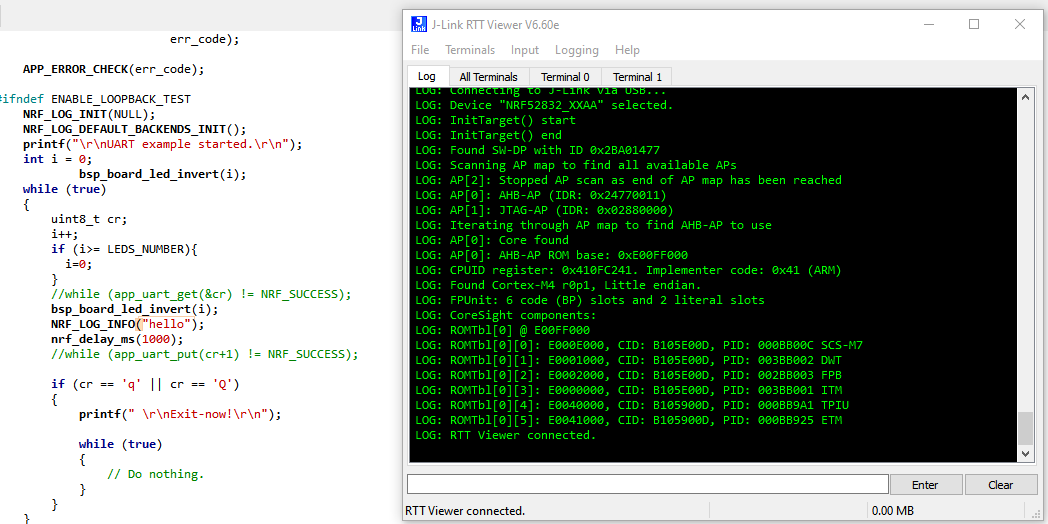
It’s my first time using RTT and it seems that my logs are not getting written to the RTTViewer. I tried connecting to RTT with the USB setting \> SWD \> 4000kHz, but nothing appears on it. Would you know the proper settings needed?
---
### Author:  [@otso](https://f.ruuvi.com/u/otso)
#### Post date: [9 March 2020 21:54 UTC](https://f.ruuvi.com/t/how-can-i-read-data-output-from-ruvvi-tag/4075/8 "2020-03-09T21:54:49Z")
> [@Japoy\_Sam](#):
>
> It’s my first time using RTT and it seems that my logs are not getting written to the RTTViewer. I tried connecting to RTT with the USB setting \> SWD \> 4000kHz, but nothing appears on it. Would you know the proper settings needed?
You need to configure sdk\_config.h, be sure to disable BACKEND\_UART if it is enabled. Below are the Ruuvi Driver settings used in sdk\_config.h
>
>
---
### Author:  [@Japoy\_Sam](https://f.ruuvi.com/u/Japoy_Sam)
#### Post date: [10 March 2020 11:35 UTC](https://f.ruuvi.com/t/how-can-i-read-data-output-from-ruvvi-tag/4075/9 "2020-03-10T11:35:35Z")
Thanks! got it to work now! 😃
---
### Author:  [@Cindy](https://f.ruuvi.com/u/Cindy)
#### Post date: [10 March 2020 18:11 UTC](https://f.ruuvi.com/t/how-can-i-read-data-output-from-ruvvi-tag/4075/11 "2020-03-10T18:11:57Z")
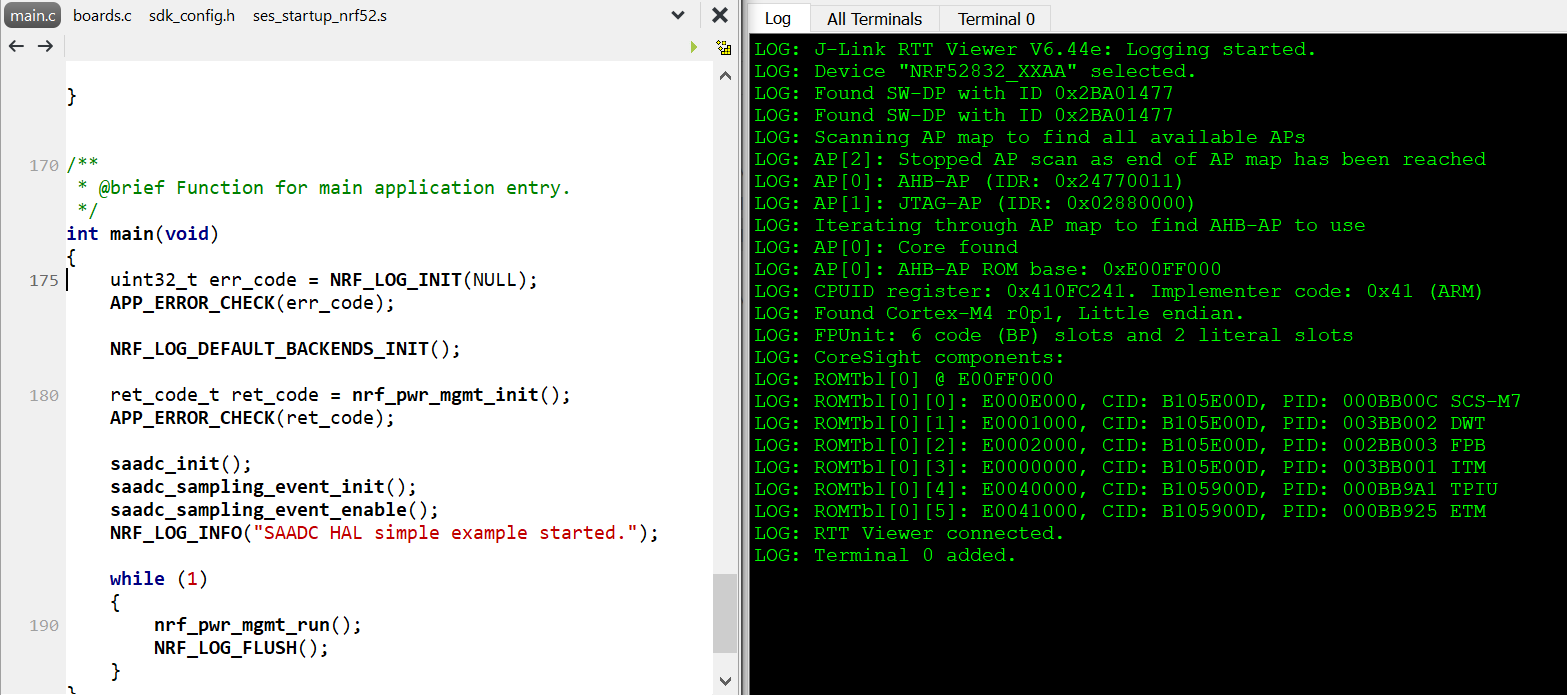
@otso
I got a similar result as Jappy\_Sam did. but I’m sorry I didn’t fully get what I should change in sdk\_config.h, would you mind to explain it a bit more?
---
### Author:  [@otso](https://f.ruuvi.com/u/otso)
#### Post date: [10 March 2020 20:14 UTC](https://f.ruuvi.com/t/how-can-i-read-data-output-from-ruvvi-tag/4075/12 "2020-03-10T20:14:53Z")
> [@Cindy](#):
>
> I got a similar result as Jappy\_Sam did. but I’m sorry I didn’t fully get what I should change in sdk\_config.h, would you mind to explain it a bit more?
Your sdk\_config.h may or may not have these lines:
```auto
#define NRF_LOG_ENABLED 1
#define NRF_FPRINTF_FLAG_AUTOMATIC_CR_ON_LF_ENABLED 0
#define NRF_LOG_DEFERRED 0
#define NRF_LOG_BACKEND_RTT_ENABLED 1
```
You need to sure that if there already are those lines, they have right value and if they’re not there already you need to add them. You’ll also need to check that there is no
`NRF_LOG_BACKEND_UART_ENABLED 1` in your sdk\_config.h
---
### Author:  [@Cindy](https://f.ruuvi.com/u/Cindy)
#### Post date: [11 March 2020 16:27 UTC](https://f.ruuvi.com/t/how-can-i-read-data-output-from-ruvvi-tag/4075/13 "2020-03-11T16:27:08Z")
> [@otso](#):
>
> NRF\_FPRINTF\_FLAG\_AUTOMATIC\_CR\_ON\_LF\_ENABLED 0
Thanks for your help,
it works now!
Cindy